How I Audited My Next.js Project Structure — Deleted Dead Code, Reorganized Files, and Fixed .gitignore in 47 Minutes
I audited a 149-page Next.js 14 project and found 23+ misplaced files, 8 dead code files, and 6 missing .gitignore patterns. Here is the exact process, prompts, and commands I used to clean everything up in 47 minutes.

Read time: 12 min | Last updated: February 27, 2026
23 misplaced files. 8 dead code files nobody called. A .gitignore missing 6 patterns. I audited a 149-page Next.js 14 project and cleaned everything up in 47 minutes — with prompts and step-by-step instructions you can follow.
Why Do Next.js Projects Get Messy So Fast?
Next.js App Router projects accumulate structural debt at a rate of 15-30 misplaced files within the first 6 months — especially for solo developers shipping features daily without dedicated cleanup cycles. Idea2Logic, with 149 pages and 200+ source files, had accumulated 35 files that needed attention after 5 years of solo development.
The mess falls into three buckets:
Bucket 1 — Docs scattered across root.
Files like ARCHITECTURE_DIAGRAM.md, PRODUCTION_PLAN.md, COMPLIANCE_CHECKLIST.md sitting right next to package.json. You open the project and can't tell what's config and what's documentation.
Bucket 2 — Dead code that "almost works."
I had a full LINE Login integration — 4 files with real OAuth logic. Every single one returned 501. Supabase doesn't support LINE Login. I knew this for months. Never deleted the code.
Bucket 3 — A .gitignore frozen in time.
No patterns for .bak files, *_TEMP* artifacts, or demo HTML. My git history had backup files that should never have been committed.
Sound familiar? Every solo project I've seen has some version of this problem. It's not a failure — it's what happens when you're busy shipping.
What Does a Next.js Project Audit Actually Look Like?
A Next.js project audit has 5 steps: (1) scan root for misplaced files (2) grep for dead code and orphan components (3) check .gitignore coverage (4) move or delete files (5) verify with a clean build. I audited Idea2Logic's 149 pages in 47 minutes — found 8 dead code files and moved 27 files to proper locations.
Step 1: Scan the Root Directory (5 minutes)
Open your terminal. List everything that isn't a config file:
ls -1 *.md *.txt *.bak 2>/dev/null | head -20I found 10 markdown files that weren't README or CLAUDE.md. Ten. All of them were project docs that belonged in a docs/ folder.
The rule is simple: root should only have config files (package.json, tsconfig.json, next.config.mjs), README, and maybe one or two project-level docs. Everything else goes to docs/.
Step 2: Find Dead Code (10 minutes)
This is where the real wins are. Dead code doesn't break anything at runtime — but it breaks every developer who has to read it.
# Find components with no page importing them
for f in src/components/**/*.tsx; do
  name=$(basename "$f" .tsx)
  count=$(grep -r "$name" src/app/ --include="*.tsx" -l | wc -l)
  if [ "$count" -eq 0 ]; then
    echo "ORPHAN: $f"
  fi
done
This found SchemaScript.tsx — a structured data component I built once and never wired up.
The bigger find was LINE Login. Four complete files — all returning 501. All completely useless. All taking up mental space every time I navigated the codebase.
Step 3: Check .gitignore (5 minutes)
# Look for files that shouldn't be tracked
git ls-files | grep -E "\.(bak|tmp)$"

# Count existing patterns
cat .gitignore | wc -l
I found zero patterns for backup files, temp files, or demo assets. A PROJECT_PLAN.md.bak had been living in my git history the entire time.
Step 4: Move and Delete (15 minutes)
Two different commands depending on git tracking status:
# Tracked files → git mv (preserves history)
git mv COMPLIANCE_CHECKLIST.md docs/
git mv IMPROVEMENT_PLAN.md docs/

# Untracked files → regular mv
mv ARCHITECTURE_DIAGRAM.md docs/

# Dead code → delete
rm src/components/shared/SchemaScript.tsx
rm -rf src/lib/line/
rm -rf src/app/api/auth/line-connect/
Critical: Before deleting anything, grep for references:
grep -r "SchemaScript" src/ --include="*.tsx" --include="*.ts"
grep -r "LineConnect" src/ --include="*.tsx" --include="*.ts"
Step 5: Build Verify (12 minutes)
rm -rf .next && npm run build0 errors = done. Any error = you missed an import. Go back to Step 4.
My build passed first try — 149 pages, 0 errors, 0 dead-code warnings.
Manual Audit vs AI-Assisted Audit — Which Is Better?
Both manual and AI-assisted audits clean up project structure, but AI-assisted is 2-3x faster because AI can scan, classify, and generate cleanup commands in seconds. I used Claude to help audit Idea2Logic, cutting what would have been ~2 hours of manual work down to 47 minutes.
| Feature | Manual Audit | AI-Assisted | Winner |
|---|---|---|---|
| ⚡ Scan speed | 30-60 min | 2-5 min | 🏆 AI |
| 🎯 Dead code accuracy | Grep one at a time | Cross-ref auto | 🏆 AI |
| 🧠 Decision making | You decide (better) | AI suggests, review | 🏆 Manual |
| 💼 Business context | Full understanding | Needs context | 🏆 Manual |
| ⌨️ Command generation | Type it yourself | Generated & ready | 🏆 AI |
| 💰 Cost | $0 (your time) | ~$0.15 API | 🏆 Manual |
What Prompts Actually Work for Project Audits?
A good project audit prompt needs a clear role, specific scope, and an output format that gives you runnable commands — not vague advice. I used these 2 prompts with Claude and got actionable results both times.
Prompt 1: Project Structure Audit
Works with: Claude / ChatGPT | Level: Intermediate
You are a Senior Software Architect specializing in {{framework}} projects.

Audit this project's file structure:
- Framework: {{framework}}
- Root directory files: {{root_files}}
- Source structure: {{src_structure}}

Check 4 things:
1. Files in wrong directories (where should they be?)
2. Dead code / orphan components (files nothing imports)
3. Missing .gitignore patterns
4. Temp/backup files that should be deleted

Reply as a table:
| File | Problem | Action | Shell Command |
Every row must include a runnable shell command.

Do not hedge. State what should be done.
Variables:
{{framework}}= Next.js 14 App Router / Nuxt 3 / SvelteKit / etc.{{root_files}}= output ofls -1in root{{src_structure}}= output offind src -type f | head -50
Why this works: Specific role (architect) + forced output format (table with commands) + constraint (no hedging). The AI can't give vague advice because every row needs a command.
Prompt 2: Dead Code Scanner
Works with: Claude (recommended) | Level: Intermediate-Advanced
You are a Code Quality Lead specializing in {{framework}}.

Analyze this code and find dead code:

{{code_snippet}}

Dead code means:
1. Components with no page route importing them
2. Functions not called from any other file
3. API routes that always return error codes (501, 503)
4. Import statements that import unused modules

Reply as:
| File/Function | Dead Code Type | Reason | Safe to Delete? | Pre-deletion Steps |

If there's a dependency chain (A imports B, B imports C) → specify deletion order.
Why this works: Four specific definitions of "dead code" means no ambiguity. Forcing "pre-deletion steps" prevents build breakage.
What Types of Files End Up in the Wrong Place?
Misplaced files in Next.js projects fall into 5 categories: (1) documentation dumped in root (2) temp/backup files (3) demo assets in public/ (4) committed dead code (5) draft content mixed with source code. Auditing Idea2Logic, I found all 5 types totaling 35 files.
| Type | Examples | Count | Action |
|---|---|---|---|
| 📄 Documentation | ARCHITECTURE_DIAGRAM.md, PRODUCTION_PLAN.md | 7 files | Move to docs/ |
| 📦 Temp/Backup | PROJECT_PLAN.md.bak, PROJECT_PLAN_TEMP.txt | 2 files | Delete |
| 🖼️ Demo Assets | public/demo-layout-comparison.html | 1 file | Delete |
| 🗑️ Dead Code | LINE integration (4), SchemaScript.tsx | 5 files | Delete |
| 📋 Phase Reports | PHASE_REPORTS/ (13 files) | 13 files | Move to docs/ |
| ✍️ Blog Drafts | Blog/ (7 files) | 7 files | Move to docs/ |
35 files total — 8 deleted, 27 moved.
When I saw that number I was genuinely surprised. I expected maybe 5 or 6. Not 35.
What Makes Dead Code Dangerous?
The most dangerous dead code isn't code that "doesn't work" — it's code that "almost works." Stub code with real logic that always returns errors wastes the next developer's time trying to fix it instead of building fresh. My LINE Login integration was the perfect example — 4 files, full OAuth logic, return 501 every time.
I rank dead code danger in 3 levels:
Level 1 — Harmless (delete immediately):
- Orphan components with no page import
- Unused utility functions
- My example: SchemaScript.tsx
Level 2 — Misleading (delete + fix references):
- Components that are imported but never rendered (commented out)
- API routes that exist but are never called from frontend
- My example: LineConnect.tsx imported in account page
Level 3 — Dangerous (delete + clean up everywhere):
- Stub code returning errors — developers will waste time trying to fix it
- Feature flags that can never be enabled
- My example: LINE OAuth flow that Supabase doesn't support
I lost 2 hours trying to make LINE Login work before realizing Supabase doesn't support it. If someone had audited and removed that code earlier, those 2 hours would have been saved. Completely.
What Did the Audit Results Look Like?
Before the audit, root had 13 markdown files + a Blog/ folder + a PHASE_REPORTS/ folder — none related to code. After: root has 3 files (README.md, CLAUDE.md, PROJECT_PLAN.md), 77% cleaner. Dead code went from 8 files to zero. Build: 149 pages, 0 errors.
Before:
root/
├── ARCHITECTURE_DIAGRAM.md    ← wrong place
├── Blog/                       ← wrong place (7 files)
├── COMPLIANCE_CHECKLIST.md     ← wrong place
├── PHASE_REPORTS/              ← wrong place (13 files)
├── PRODUCTION_PLAN.md          ← wrong place
├── PROJECT_PLAN.md.bak         ← delete
├── src/lib/line/               ← dead code (2 files)
├── src/components/.../LineConnect.tsx  ← dead code
├── src/components/.../SchemaScript.tsx ← dead code
├── src/app/api/auth/line-connect/     ← dead code (2 files)
└── ...configs (correct)
After:
root/
├── CLAUDE.md          ✅
├── README.md          ✅
├── PROJECT_PLAN.md    ✅
├── docs/
│   ├── ARCHITECTURE_DIAGRAM.md
│   ├── blog-drafts/   (7 files)
│   ├── phase-reports/  (13 files)
│   └── archive/
└── ...configs + src (zero dead code)The most dangerous dead code isn't code that "doesn't work" — it's code that "almost works." Because the next developer will spend hours trying to fix it instead of building something new from scratch.
Never run rm -rf without grepping first. Every time you're about to delete dead code — run grep -r "filename" src/ first to check for references in other files.
How Often Should You Audit Your Project Structure?
Audit every 2-4 weeks, or before every major release — never let it go past 90 days. From my experience with Idea2Logic, where I average 3-5 commits per day, the structure starts getting messy within 2 weeks if you're not paying attention.
My personal rules:
- Before every production deploy — audit. No exceptions. Ever.
- Every 2 weeks — run the audit script, check for orphan files
- After completing a big feature — delete all experimental code that didn't make the cut
FAQ
Q: What if deleting dead code breaks my build?
A: Check the error message for which file is importing the deleted module — then fix or remove that import. Before deleting any file, always run grep -r "filename" src/ first to find every reference. If grep finds references, fix them before deleting.
Q: Which root directory files should I keep vs move?
A: Keep in root: config files (package.json, tsconfig.json, next.config.mjs), README.md, CLAUDE.md, LICENSE. Move to docs/: all other documentation. Delete: *.bak, *_TEMP*, demo files that aren't part of the app.
Q: What's the difference between git mv and mv?
A: git mv is for files that git already tracks — it preserves file history as a move, not delete+create. Regular mv is for untracked files since git doesn't know about them yet.
Q: Is it safe to use AI for project audits?
A: Safe if you use it right. Let AI "analyze" and "recommend" only — review every command before executing. Check two things before deleting: (1) grep confirms no references (2) git status confirms no uncommitted changes. If unsure — move to archive/ instead of deleting.
Q: How big does a Next.js project need to be before an audit matters?
A: Any size benefits. But larger projects benefit more — projects with 50+ pages have an average dead code rate of 5-10% of the codebase. Idea2Logic at 149 pages had 8 dead files, roughly 3%. That's low for a solo project.
Nat — Founder, Idea2Logic
Developer building a real business with AI + Next.js + Supabase every day
Disclosure: I receive no commissions from any tools mentioned in this article
ชอบบทความนี้ใช่ไหม?
สมัครสมาชิก Idea2Logic เพื่อเข้าถึง Content, Template และ Community คุณภาพสูง
สมัครสมาชิกบทความที่เกี่ยวข้อง

ผมสร้าง idea2logic.com ด้วย AI — เปิดโครงสร้าง 30+ หน้า 40+ API ทั้งระบบ
ผมสร้าง idea2logic.com ทั้งระบบด้วย AI — 30+ หน้า, 40+ API, 14 database tables ค่า server ไม่ถึง 1,000 บาท/เดือน บทความนี้เปิดโครงสร้างทั้งหมดด้วย Interactive Diagram

AI Content Factory: ระบบ 9 Stages ที่เปลี่ยนบันทึกงาน เป็น Content 14+ ช่องทาง อัตโนมัติ
ระบบ AI Pipeline 9 Stages ที่เปลี่ยนบันทึกงานประจำวัน เป็น content กระจายข้ามทุก platform ทั้ง TH + EN อัตโนมัติ — ต้นทุน 2,400 บาท/เดือน ไม่ต้องออกกล้อง ไม่ต้องเขียน code
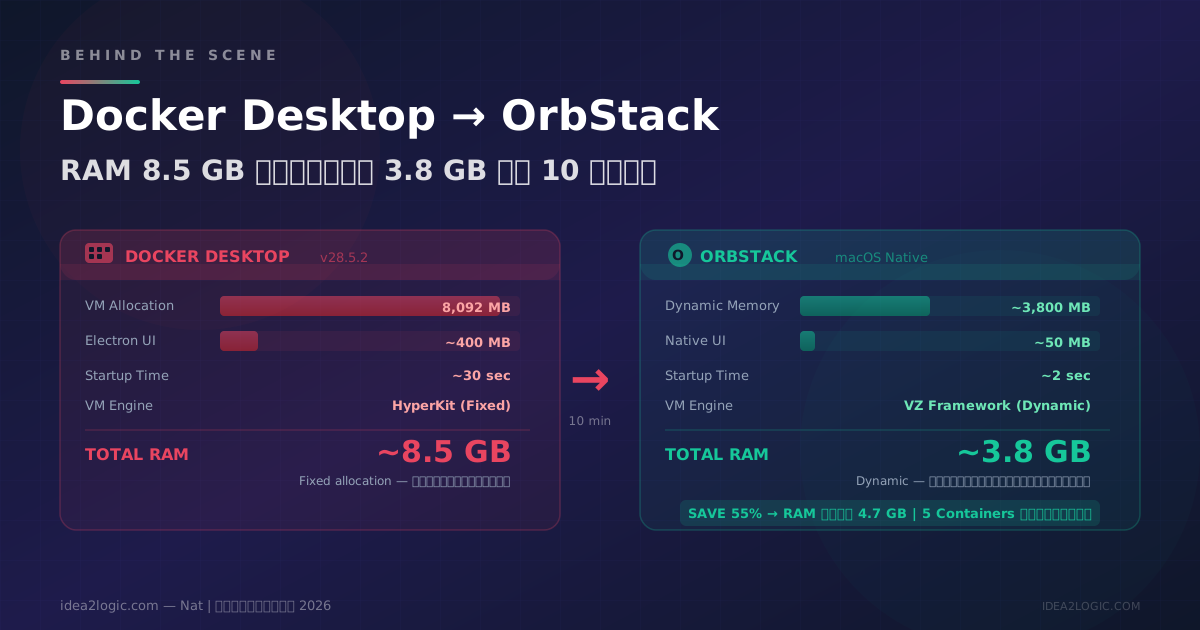
เครื่อง Mac ช้าจนทนไม่ไหว: ถาม AI หาปัญหา — ลด RAM จาก 8.5 GB เหลือ 3.8 GB ใน 10 นาที
เครื่อง Mac ช้า RAM 36 GB ไม่พอ? ผมถาม AI ว่าปัญหาอยู่ตรงไหน — พบว่า Docker Desktop กิน RAM 8.5 GB ให้ AI ย้ายไป OrbStack เสร็จใน 10 นาที ลด RAM เหลือ 3.8 GB ไม่ต้องเขียน code แม้แต่บรรทัดเดียว